What Buyers Should Know About GMC and Buick Connectivity Options
Posted by James Ruppert | Oct 27, 2026 | 4 x 4, GMC, Buick, Connectivity, Technology
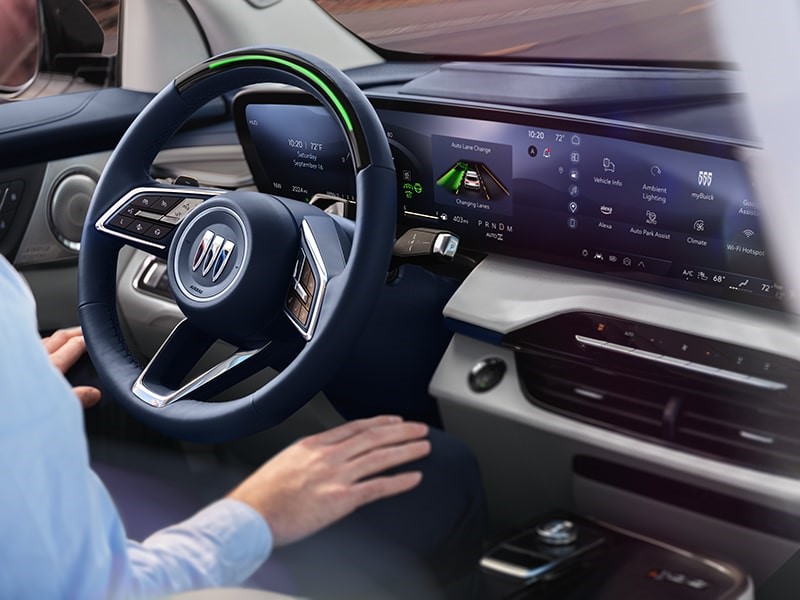
Modern vehicles offer more than transportation. Connectivity features help drivers access navigation, manage calls, stream music, and stay informed while traveling. GMC and Buick provide a range of technologies designed to make everyday driving more convenient, from smartphone integration to connected services and available in-vehicle Wi-Fi. Buyers comparing models should also consider how these features affect ownership costs. Exploring GMC and Buick financing options can help shoppers plan their budget while evaluating which vehicle best fits their needs. Understanding the available connectivity options makes it easier to choose a vehicle that matches your lifestyle.
Smartphone Integration With Apple CarPlay and Android Auto
Smartphone integration is one of the most useful connectivity features available in many GMC and Buick vehicles. Compatible systems allow drivers to access selected phone functions through the vehicle’s infotainment display.
Apple CarPlay supports compatible iPhones, while Android Auto works with compatible Android phones. Depending on the vehicle, drivers may be able to use navigation apps, make calls, send messages, and listen to music through supported applications.
Some models support wireless connections, while others require a USB cable. Buyers should confirm which connection method is available on the specific model and trim they are considering.
These systems can make daily commutes and longer journeys more convenient. However, compatibility depends on the vehicle’s equipment, smartphone, software, and connection requirements.
Built-In Google Features and Navigation
Some newer GMC and Buick models offer Google built-in, which integrates supported Google services directly into the vehicle’s infotainment system. Depending on the vehicle and service availability, drivers can access Google Maps, Google Assistant, and compatible apps through Google Play.
Google Maps can provide navigation and traffic information, helping drivers plan routes and respond to changing road conditions. Voice commands may allow users to request directions, control certain vehicle functions, or access supported features without manually navigating menus.
Google built-in is different from Android Auto. Android Auto projects supported smartphone apps onto the vehicle display, while Google built-in operates through the vehicle’s own infotainment system.
Not every GMC or Buick includes Google built-in. Buyers should check the model year, trim, and equipment list before assuming these services are available.
Bluetooth and Hands-Free Communication
Bluetooth connectivity lets drivers pair compatible smartphones with their vehicles for convenient communication and audio playback. Depending on the system, users can make or receive calls, listen to music, and access selected phone functions through the infotainment interface.
This feature is particularly useful for drivers who want a simple wireless connection without plugging in their phones every time they enter the vehicle.
Setup procedures can differ between models, but pairing typically involves opening the vehicle’s Bluetooth settings, selecting the phone, and following the prompts on both devices.
Drivers should configure their phones while parked and use hands-free controls responsibly. Keeping attention on the road remains essential, even when the vehicle supports voice commands.
Wi-Fi Hotspots and Connected Services
Some GMC and Buick models offer an available built-in Wi-Fi hotspot. This feature can allow compatible devices, such as tablets and laptops, to connect to the internet while traveling, subject to coverage and an active data plan.
A hotspot may be helpful for families on road trips or passengers who need internet access during longer journeys. It can also reduce the need to use a phone’s personal hotspot.
Connected services may provide additional capabilities through OnStar and the myGMC or myBuick mobile apps. Depending on the vehicle and subscription, these services may include remote vehicle functions, vehicle status information, navigation assistance, and other conveniences.
Buyers should review which services are included with the vehicle, how long any trial lasts, and what subscription fees apply afterward. Availability and functionality vary by model and service plan.
Wireless Charging and USB Connectivity
Connectivity also depends on convenient ways to charge devices. Many GMC and Buick vehicles provide USB ports for charging phones and other compatible electronics. Some ports support data connections, while others are intended only for charging.
Selected models also offer wireless phone charging. This can reduce cable clutter and make it easier to keep a compatible smartphone powered during daily trips.
Before purchasing, check the number and location of charging ports, especially if you regularly travel with family members or passengers who use multiple devices. Confirm that your phone supports wireless charging if this feature is important to you.
A short test during a dealership visit can help you determine whether the charging setup works with your devices.
Software Updates and Feature Compatibility
Vehicle software can influence how well connectivity features perform. Some models support software updates that improve system functionality or provide eligible new features. The update process and available capabilities depend on the vehicle.
Buyers considering a used GMC or Buick should check whether its infotainment system has current software and whether the previous owner configured connected services correctly. Older models may offer different features from newer vehicles, even when their displays look similar.
It is also worth testing smartphone pairing, navigation, voice controls, and audio playback before completing a purchase. If a particular feature is essential, ask the dealership to demonstrate it rather than relying solely on a brochure or online listing.
How to Choose the Right Connectivity Package
The best connectivity setup depends on your driving habits. Commuters may prioritize smartphone integration and hands-free calls, while frequent travelers may prefer built-in navigation and available connected services. Families might benefit from a Wi-Fi hotspot and multiple charging ports.
Before choosing a vehicle, consider these questions:
-
Does it support your smartphone and preferred connection method?
-
Are navigation, remote functions, or Wi-Fi services included, or do they require subscriptions?
-
Are wireless charging and enough USB ports available for your devices?
Comparing these details can help you avoid paying for features you rarely use or missing a capability that would improve your daily driving experience.
Conclusion
GMC and Buick offer a variety of connectivity options designed to improve convenience, communication, navigation, and entertainment. Available features can include Apple CarPlay, Android Auto, Google built-in, Bluetooth, Wi-Fi hotspots, connected mobile apps, and wireless charging. However, availability varies by model, year, and trim, and some services require separate subscriptions or data plans. By checking compatibility, testing key features, and understanding ongoing costs, buyers can choose a GMC or Buick that keeps them connected in ways that genuinely support their driving needs.